
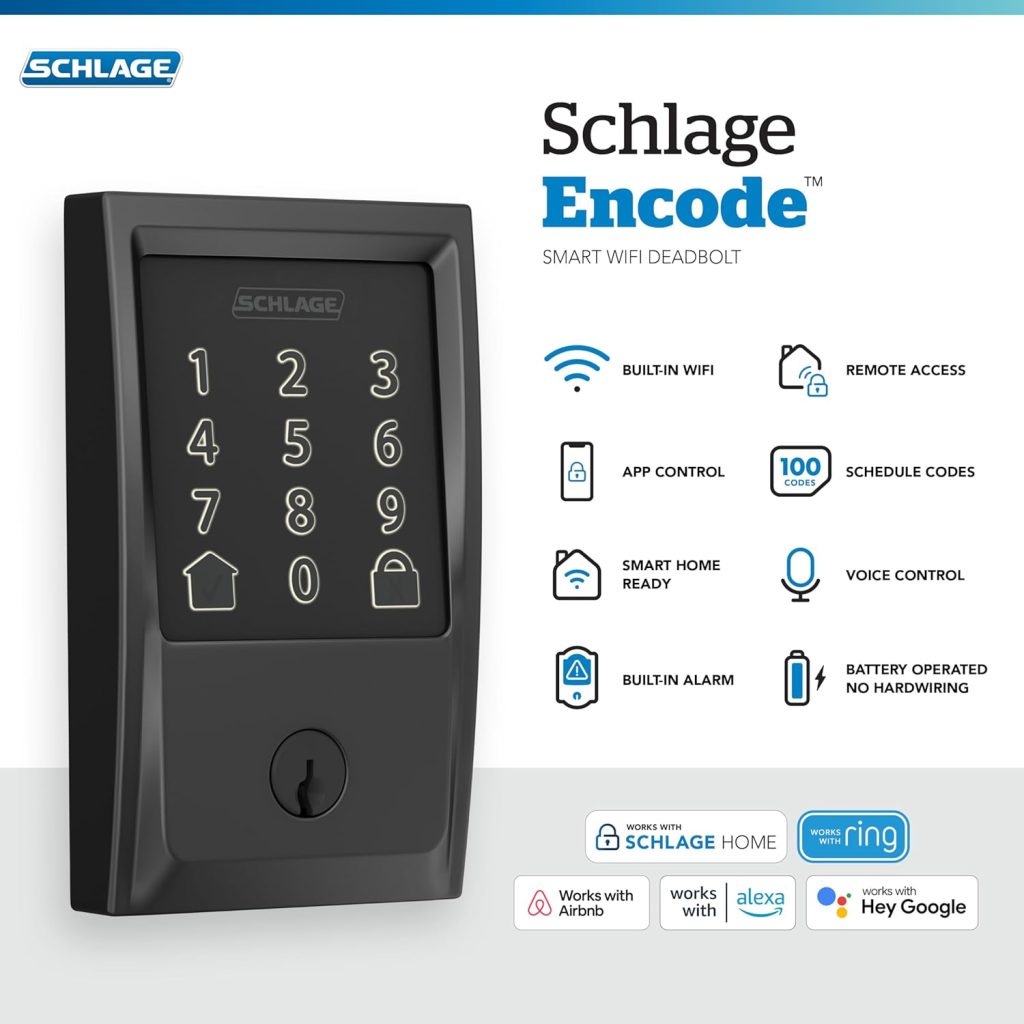
Schlage Encode Smart WiFi Deadbolt Lock (Matte Black) – The Smarter Way to Secure Your Front Door
Home security in the United States has changed dramatically in recent years. Traditional keys are no longer enough for homeowners who want convenience, remote control, and total access management.
If you’re looking for a smart lock that combines trusted security with modern technology, the Schlage Encode Smart WiFi Deadbolt Lock is built exactly for that purpose.
This guide will help you understand:
- Who should buy this smart lock
- Why it’s worth upgrading from traditional locks
- How it works
- How to install and use it
- And answers to the most common buyer questions
Let’s break it down.
Who Should Buy the Schlage Encode Smart Lock?
This smart deadbolt is ideal for
1. Homeowners Who Want Keyless Convenience
If you’re tired of:
- Losing keys
- Hiding spare keys outside
- Getting locked out
This lock eliminates those problems completely. You can unlock your door using:
- The touchscreen keypad
- The Schlage mobile app
- Voice assistants like Alexa or Google Assistant
No physical key required.
2. Airbnb & Short-Term Rental Hosts
If you manage rental properties, this lock is a game-changer.
It works with Airbnb, allowing you to
- Create unique access codes for each guest
- Set start and end dates for codes
- Delete codes automatically after checkout
No more meeting guests for key handoff.
No more worrying about copied keys.
For property investors and hosts, this means:
- Better security
- Automated access
- Higher professionalism
3. Busy Families
Families with kids, teenagers, or house cleaners benefit greatly from:
- Custom entry codes for each person
- Activity tracking through the app
- Remote locking/unlocking
You can see who entered and when directly from your phone.
4. Professionals & Frequent Travelers
Travel often? Work long hours?
With built-in WiFi (no extra hub needed), you can:
- Lock or unlock your door from anywhere
- Check door status remotely
- Receive notifications
Whether you’re at the office or out of state, your home stays under your control.
Why Choose Schlage Over Other Smart Locks?
The brand behind this product, Schlage, has over 100 years of experience in door hardware security. In the U.S. market, Schlage is known for:
- Durability
- Strong deadbolt construction
- Reliable locking mechanisms
The Encode Smart Lock combines that trusted physical security with advanced WiFi technology.
Key Features That Make It Worth Buying
Built-In WiFi (No Hub Required)
Many smart locks require an additional hub.
This one doesn’t.
The WiFi is built directly into the lock, allowing you to connect it straight to your home network through the Schlage app.
This makes installation easier and reduces extra costs.
Keyless Entry with Touchscreen
The fingerprint-resistant touchscreen keypad allows you to:
- Create up to 100 unique access codes
- Share codes with guests or family
- Use temporary or permanent codes
Perfect for:
- Dog walkers
- House cleaners
- Contractors
- Delivery access
Voice Assistant Compatibility
The lock works with:
- Amazon Alexa
- Google Assistant
You can:
- Lock your door using voice commands
- Check if the door is locked
- Integrate with your smart home system
This adds convenience and automation to your daily routine.
Strong Deadbolt Security
While it’s smart, security remains the top priority.
Features include:
- BHMA Grade 1 security rating (highest residential rating)
- Built-in alarm technology
- Durable matte black finish
- Reinforced deadbolt mechanism
This is not just a gadget — it’s serious home protection.
How to Install the Schlage Encode
One of the biggest concerns buyers have is installation.
Good news: Most homeowners can install it themselves.
Basic Installation Steps:
- Remove your existing deadbolt
- Insert the new Schlage deadbolt mechanism
- Attach exterior keypad
- Connect interior battery housing
- Install batteries
- Connect to WiFi via the app.
No professional wiring required.
No electrician needed.
Installation usually takes about 30 minutes.
How to Use It After Installation
Once installed:
- Download the Schlage Home app
- Connect to WiFi
- Create your admin code
- Add user codes
- Enable notifications
You can now:
- Monitor entry activity
- Lock/unlock remotely
- Assign guest access
- Manage everything from your phone
Frequently Asked Questions (FAQ)
Q1: Does this lock work without WiFi?
Yes.
The keypad works locally even if WiFi is down. However, remote access and app control require WiFi.
Q2: What happens if the battery dies?
The lock sends low-battery notifications through the app.
If batteries completely die, you can use a physical key backup.
Q3: Is it safe from hacking?
Schlage uses advanced encryption technology.
Plus, it is backed by one of the most trusted lock manufacturers in the U.S.
Q4: Can I create temporary guest codes?
Yes.
You can create time-based codes for guests, renters, or service providers.
Q5: Does it work with smart home systems?
Yes.
It integrates with Alexa and Google Assistant for voice control and automation.
Why Customers Are Choosing Smart Locks in 2026
Modern American homeowners prioritize the following:
- Convenience
- Security
- Remote control
- Smart home integration
The Schlage Encode Smart WiFi Deadbolt meets all these expectations in one device.
It removes the stress of lost keys, improves rental property management, and adds an extra layer of control to your home.
Final Thoughts – Is It Worth Buying?
If you:
- Own a home
- Manage rental properties
- Travel frequently
- Want smarter security
- Are building a smart home
Then yes—this smart lock is a strong investment.
It combines trusted mechanical strength with advanced smart features, making it one of the most practical home security upgrades available in the U.S. market today.
Security should be simple.
Convenience should be smart.
SHOP NOW